Feature Spotlight: Spreadsheet Calculator – Intelligent Pricing Powered by servicePath™
Discover how servicePath™ combines native Excel logic, one-click quoting, and enterprise security to deliver a true hybrid CPQ solution—no rebuilding required.
From Excel Superpower to Operational Hurdle
Finally! A CPQ solution that doesn’t make you choose between Excel’s power and professional quoting
Remember that feeling when you first discovered Excel could do more than just basic math? The excitement of building your first VLOOKUP, the satisfaction of watching complex formulas cascade through hundreds of rows, the moment you realized you’d created something genuinely powerful for your business?
Fast forward to today. That same spreadsheet – the one that started as a simple pricing calculator – has evolved into a mission-critical beast. It’s got lookup tables, conditional formatting, intricate formulas that would make a rocket scientist proud, and frankly, it’s the secret sauce behind your competitive pricing strategy.
But here’s the thing that keeps you up at night: your sales team is still bouncing between that Excel masterpiece and your shiny CPQ system like they’re playing some twisted game of pricing ping-pong.
The irony? Excel isn’t slowing down your team—it’s what happens around Excel that does: error-prone copy-paste, version confusion, slow updates, compliance gaps, IP exposure—all amplified in mid-to-large enterprises where complexity is part of the DNA.
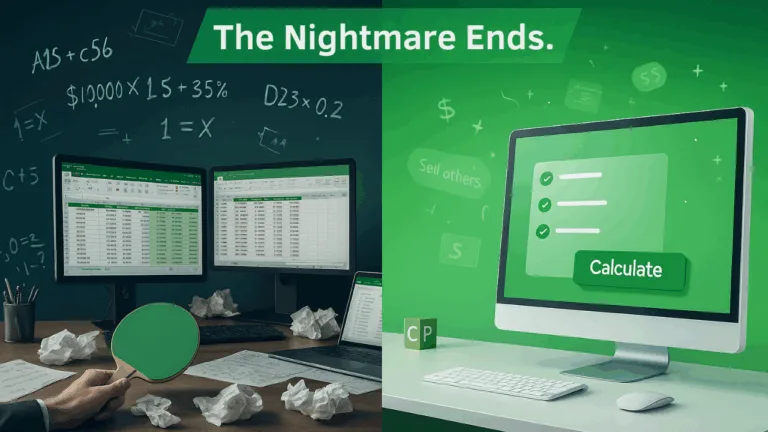
Today, that nightmare ends.
Enter servicePath™ Spreadsheet Calculator—built to preserve every ounce of your Excel intelligence while automating manual steps and safeguarding accuracy. This blog breaks down how this feature transforms quoting—from finance-built spreadsheets to sales‑ready CPQ—without compromise.
The Excel Dilemma: When Your Superpower Becomes Your Kryptonite
Let’s talk about what’s really happening behind the scenes of most pricing operations in mid-to-large B2B tech organizations.
Your finance and product teams have spent months—if not years—crafting pricing models in Excel that actually work. These aren’t just spreadsheets. They’re living, breathing representations of your company’s sales intelligence—battle-tested across pricing wars, market crashes, vendor shifts, and customer demands. Inside those files are:
- Multi-dimensional pricing matrices accounting for geography, deal volume, customer segment, and bundling logic
- Sophisticated margin structures that adjust dynamically based on cost inputs and real-time profitability thresholds
- Discounting logic complex enough to make a chess grandmaster sweat
- Massive lookup tables that cross-reference everything from regional multipliers to customer-specific deal terms
They’ve become a core part of your revenue strategy. So why do they also create chaos?
Because despite all that power, these spreadsheets live outside your quoting workflow. They require reps to manually enter values, copy and paste outputs, double-check calculations, and then hope nothing gets lost—or broken—on the way back into your CPQ system.
As one of our implementation specialists summed it up during a demo:
“Clients are dealing with incredibly complex spreadsheets where sales reps have to jump between systems, re-enter values, paste data from third-party sources, and run calculations on their own. It’s not just inefficient—it’s a recipe for errors that can kill deals and destroy margins.”
And here’s the brutal truth: According to recent research by Valorx, companies relying on manual spreadsheet processes see sales cycles that are 28% longer than organizations with automated pricing workflows. That’s the difference between hitting your revenue targets and explaining shortfalls to the board.
So Why Not Just Rebuild It in CPQ?
Because it’s not that simple—and it never has been.
- Excel Flexibility vs. CPQ Rigidity : In Excel, a finance analyst can tweak a margin rule, add a new tier, or simulate a price scenario in real time. In most CPQ systems, those same changes require admin-level access, formal change requests, and multi-week implementation timelines—often through IT.
- Ownership and Agility: Finance owns the spreadsheet. They can adapt to market shifts within hours. Rebuilding that logic in CPQ hands ownership over to technical teams—and slows every adjustment.
- Transparency and Traceability: Excel is auditable. Anyone can follow the logic, cell by cell. In CPQ? Once a formula is hard-coded into a pricing rule engine, it’s buried—hard to trace, harder to debug.
Why You Still Rely on Excel
Because you have no better option. Most CPQ platforms force you to choose: rebuild your IP into their limited framework or maintain a fragile, manual bridge.
That’s where servicePath™ changes the game. It’s not a rip-and-replace. It’s a bridge—preserving your Excel power while embedding it directly into your quoting flow.
The Core Issue: CPQ Systems Don’t Fully Support Complex Pricing Models
Most enterprise CPQ solutions—including Salesforce, Oracle, Conga, SAP, and DealHub—lack the depth to natively accommodate the type of multi-dimensional logic many enterprises have already built in Excel. Teams are forced to either:
- Rebuild and simplify pricing logic to fit within CPQ limitations, or
- Maintain parallel systems, increasing risk and complexity
servicePath™ takes a different approach. Rather than asking companies to choose between Excel and CPQ, it enables them to bring their existing pricing models into the quoting workflow—unchanged, secure, and fully integrated.
Why Existing CPQ Platforms Still Fall Short
Here’s something the industry doesn’t want to admit: every major CPQ platform treats Excel like the crazy uncle at a family reunion – acknowledged but not welcomed.
- Salesforce CPQ is undeniably powerful, but ask any admin who’s tried to replicate complex Excel logic using their formula builder. You’ll hear war stories about limitations, workarounds, and the expensive Valorx Fusion plugin that many companies buy just to get spreadsheet-like functionality.
- Oracle CPQ talks a big game about calculation engines, but try building a multi-variable pricing model with dynamic lookup tables. You’ll quickly discover why most implementations still rely on external calculation services or – you guessed it – Excel exports.
- Conga CPQ offers formula builders that work great for basic math, but they hit a wall the moment you need the kind of sophisticated financial modeling that Excel handles effortlessly.
- SAP CPQ excels at straightforward pricing rules but struggles with the complex scenarios that make your business unique.
- Even newer players like DealHub have built impressive guided selling and adaptive pricebooks, but they still require you to rebuild your Excel logic within their system constraints.
The pattern is clear: every CPQ vendor forces the same choice. Rebuild your pricing intelligence from scratch using their limited tools, or maintain parallel processes that create chaos. In these cases, teams face two choices:
- Rebuild extensive calculation logic from scratch—losing precision and business intent
- Maintain dual systems—Excel and CPQ—doubling error and delay risk
Neither aligns with innovative, agile teams. servicePath™ flips the paradigm.
The pattern is clear: every CPQ vendor forces the same choice. Rebuild your pricing intelligence from scratch using their limited tools, or maintain parallel processes that create chaos.
Until now.
Meet servicePath™ Spreadsheet Calculator: Your Bridge Between Excel and CPQ
Imagine maintaining all your Excel intelligence—formulas, tables, logic—and delivering it via your CPQ interface. Imagine your sales reps never having to touch a spreadsheet again, yet still benefiting from all the sophisticated logic you’ve built over the years.
That’s exactly what servicePath™ Spreadsheet Calculator delivers.
Instead of asking you to abandon your Excel expertise, we embrace it. Instead of forcing you to rebuild years of business logic, we integrate it seamlessly. Instead of treating your spreadsheets like legacy systems, we transform them into the engine that powers your entire quoting process.

Here’s the transformation in action:
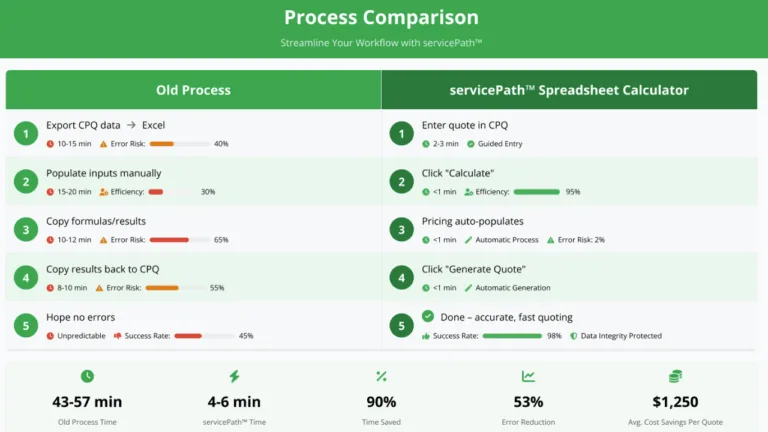
The Old Way (that everyone’s tired of): Sales rep gets a quote request → opens CPQ to gather basic info → exports data to Excel → manually enters customer parameters → performs calculations → copies results → returns to CPQ → manually enters pricing → generates quote → prays there are no errors.
The servicePath™ Way: Sales rep gets a quote request → opens CPQ → enters customer requirements → clicks “Calculate” → watches accurate pricing populate automatically → generates professional quote. Done.
What You Get
- Keep your native Excel logic intact
- Map inputs/outputs to CPQ fields with simple drag-and-drop
- Automate pricing with a single click
- Remove manual uploads and errors
Old Way vs. The servicePath™ Way
Six Daily Headaches We’re About to Cure

1. The “Which-Version-Is-Final” Syndrome
You know this pain intimately. Sarah from sales is using “PricingModel_Final_v3.xlsx” while Mike in the Dallas office is working with “PricingModel_ACTUALFINAL_v2_FIXED.xlsx.” Meanwhile, the real current version lives on Janet’s laptop because she’s the only one who remembers to update the regional multipliers.
Our solution: We create a secure, protected copy of your master workbook that lives in our cloud environment where we take a protected copy that nobody has unauthorized access to modify. Your team always works from the single, authoritative version. No more version archaeology. No more panicked Slack messages asking “which pricing file should I use?”
2. The Hidden Formula Landmine
There’s nothing quite like the sinking feeling when you discover that someone “fixed” a formula in cell B47 six months ago, and every quote since then has been using incorrect margin calculations. These stealth errors are margin killers and trust destroyers.
Our solution: Your spreadsheet logic gets stored in a controlled environment where your intricate logic stays protected from accidental changes. The sophisticated formulas you’ve perfected stay perfect, giving your CFO the peace of mind that every calculation is exactly what you intended.
3. The Copy-Paste Olympics
Your sales reps have become unwilling athletes in the most tedious sport ever invented: the copy-paste Olympics. They’re constantly shuttling data between systems, re-entering numbers, and burning valuable selling time on administrative gymnastics.
Our solution: Data flows automatically. Your reps enter customer requirements once, and our system handles all the behind-the-scenes calculation magic. What used to take 30 minutes of manual work now happens in 30 seconds.
4. The IP Security Nightmare
Your pricing models represent competitive advantage worth millions. Yet they’re sitting in email attachments, shared drives, and laptop downloads where they can be accidentally forwarded, deliberately copied, or permanently lost.
Our solution: Your intellectual property stays protected in our secure environment with role-based access controls and multi-factor authentication. When authorized users need file access, it happens within our controlled framework that maintains complete confidentiality.
5. The Audit Trail Black Hole
When compliance asks “who changed the discount structure in Q3?” your current spreadsheet setup responds with digital silence. There’s no trail, no timestamps, no accountability – just crossed fingers and hopeful explanations.
Our solution: Our comprehensive logging system tracks major changes with detailed timestamps, creating the audit trail you need for SOX, GDPR, and internal compliance requirements. Never again will you face an audit with incomplete documentation.
6. The Pricing Update Bottleneck
Market conditions change. Competitor pricing shifts. Cost structures evolve. But updating your pricing across the organization feels like steering an aircraft carrier through a parking garage. What should take hours ends up taking weeks.
Our solution: Upload your updated workbook and you’re live instantly. New pricing models, revised discount structures, updated margin requirements – they all deploy in real-time across your entire sales organization.
The 1-2-3 Setup That’ll Blow Your Mind
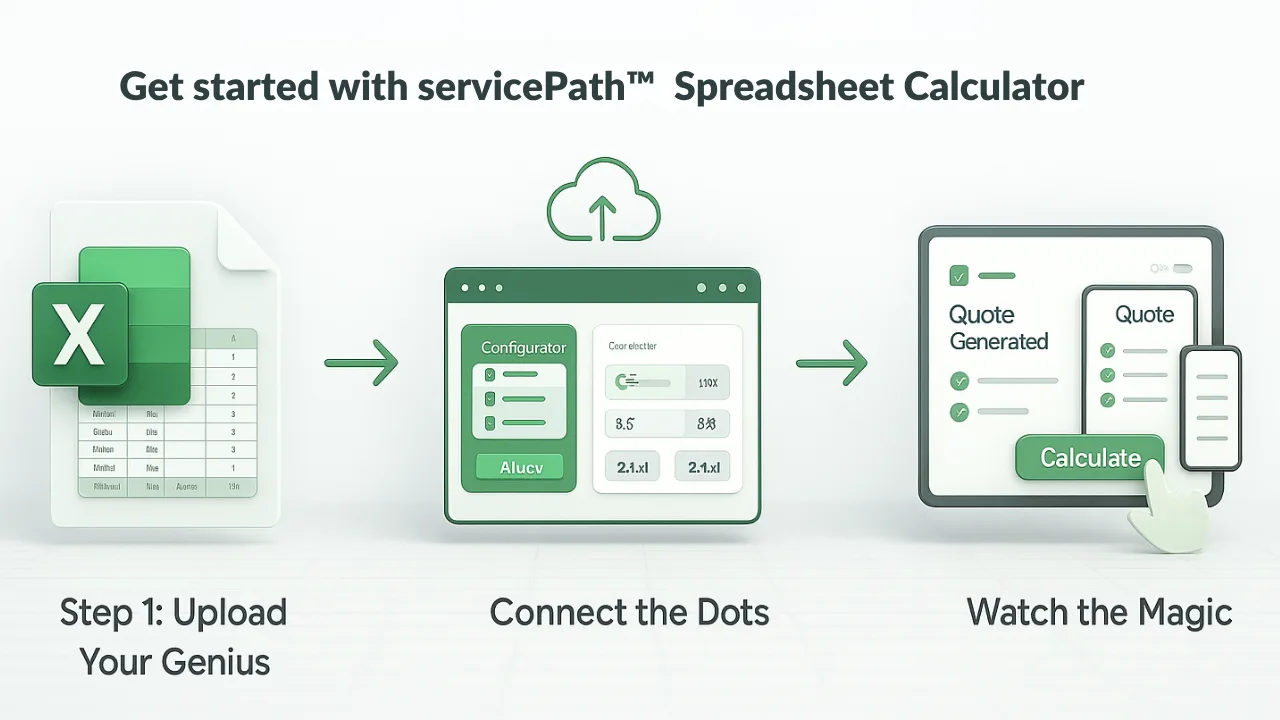 Getting started with servicePath™ Spreadsheet Calculator is so straightforward, it almost feels like cheating:
Step 1: Upload Your Genius Take that Excel masterpiece you’ve been perfecting and upload it directly into our system. Named ranges, complex formulas, lookup tables, conditional logic – everything comes along for the ride. No modification required.
Step 2: Connect the Dots Our intuitive interface lets you map your spreadsheet inputs and outputs to your CPQ system using simple drag-and-drop. Think of it as introducing your Excel logic to your CPQ system – they’re going to be best friends.
Step 3: Watch the Magic Your sales team clicks “Calculate” and watches years of pricing intelligence work seamlessly behind the scenes. Professional quotes generate automatically with all the sophisticated logic you’ve built, but none of the manual hassle.
Why servicePath™ Outpaces Other CPQ Tools
Native Excel Logic Support
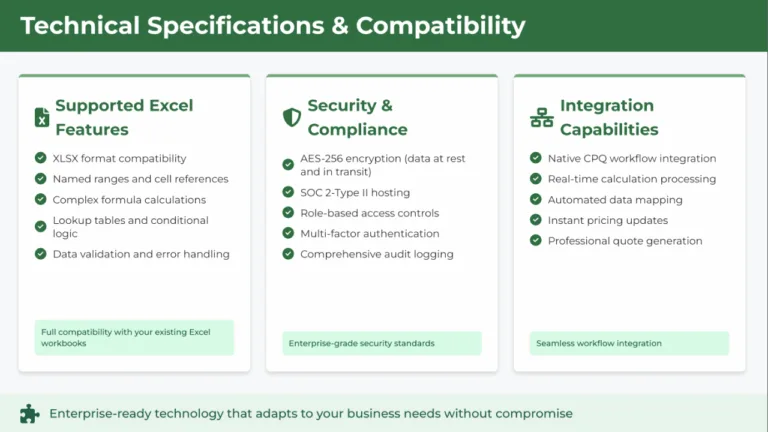
Unlike traditional CPQ tools that force you to rebuild pricing models in limited rule engines, servicePath™ executes your full Excel workbook exactly as it was built—no rewriting, no loss of complexity. All formulas, named ranges, lookup tables, and conditional logic function just as they do inside Excel.
No-Code Mapping
Our intuitive UI allows users to map input fields (customer count, geography, volume, term) to spreadsheet variables in minutes. Outputs (price, margin, total cost) flow back into the quote builder automatically—without a single line of code.
One-Click Execution
Instead of jumping through 10–20 manual steps—exporting data, modifying spreadsheets, validating numbers, then copying them back—reps click “Calculate” and watch the system deliver precision output in seconds.
Enterprise-Grade Security
We know your pricing models are sensitive. We know they represent competitive advantage. We know that security isn’t just a feature – it’s fundamental to everything we do.
That’s why servicePath™ Spreadsheet Calculator is built on enterprise-grade security infrastructure:
-
AES-256 encryption protects your data whether it’s stored or transmitted
-
SOC 2-Type II compliance means we meet the highest operational security standards
-
Role-based access controls ensure only authorized personnel can access specific pricing models
-
Multi-factor authentication adds an extra security layer for all user access
-
Comprehensive audit logging tracks all major actions for complete transparency
Your intellectual property gets the protection it deserves, not just the security that’s convenient to implement.
Rapid Rollout
With no rebuilds, IT dependencies, or code-heavy customizations, most clients roll out Spreadsheet Calculator in weeks—not quarters.
The Competitive Reality: Why We’re Different
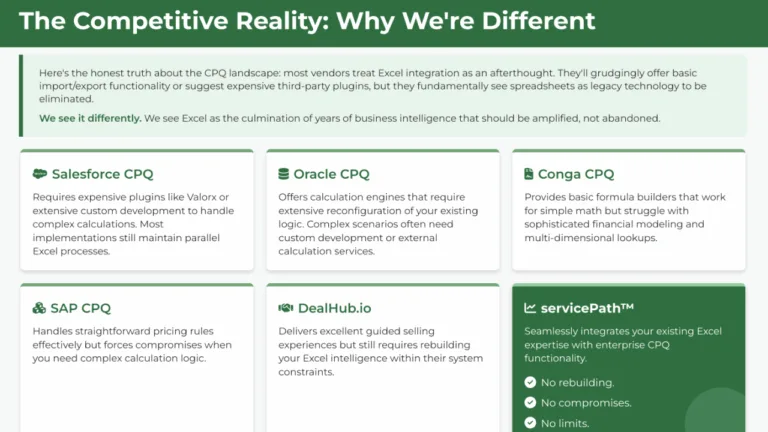
Here’s the honest truth about the CPQ landscape: most vendors treat Excel integration as an afterthought. They’ll grudgingly offer basic import/export functionality or suggest expensive third-party plugins, but they fundamentally see spreadsheets as legacy technology to be eliminated.
We see it differently. We see Excel as the culmination of years of business intelligence that should be amplified, not abandoned.
- Salesforce/Valorx: Requires expensive plug-ins and heavy testing
- Oracle: Needs middleware for complex models
- Conga/SAP: Inflexible when it comes to advanced formulas and lookup logic
- DealHub.io: Strong guided selling, but limited spreadsheet-style modeling
Only servicePath™ delivers a true hybrid: your Excel logic becomes an invisible engine behind a professional, automated CPQ interface—combining speed, precision, and scalability in one platform.
The Technical Magic (Without the Technical Headaches)
You might be wondering how we pull off this seamless integration without requiring you to become a systems integrator. The answer lies in our approach to Excel compatibility.
We support modern Excel formats (.xlsx) and handle the sophisticated features your pricing models rely on:
- Named ranges and complex cell references
- Multi-dimensional lookup tables (VLOOKUP, INDEX/MATCH, and more)
- Conditional logic and nested formulas
- Dynamic calculations that adjust based on input parameters
- Data validation and error handling
Our system creates a protected calculation environment where your Excel logic executes flawlessly while remaining completely invisible to your end users. It’s like having a PhD-level mathematician working behind the scenes on every quote.
Transformation in Action: Telecom Case Study

Let’s walk through a real-world transformation:
Client Background
A tier-one telecommunications provider relied on a 47-state Excel pricing engine featuring:
- Tiered costs (installation, equipment, maintenance)
- Deployment complexity adjustments (urban vs rural)
- Contract term interest rates
- Risk-based markup for contract length and service class
Their process:
- Sales engineer exports quote request from Salesforce/Oracle CPQ
- Download & open Excel workbook (100+MB)
- Manually input state, user count, term, service type
- Analyze outputs: cost, margin, discount, markup
- Copy results into CPQ pages
- Generate quote
Time per quote: 3–4 hours
Key issues: Human error, late delivery, duplication of effort
servicePath™ Rollout
- Uploaded workbook—no rewriting required
- Mapped 12 primary input fields and 8 output fields
- Enabled secure container execution with version control
Transformation Metrics
- Quote time dropped from 3–4 hours to <5 minutes
- Margin compliance improved to 100 %
- Sales velocity: doubled—email communication reports 1.9x more quotes per day per rep
- Error rate: zero post-launch—counter to estimated 5% before
Looking Ahead: The Future of Intelligent Pricing
The servicePath™ Spreadsheet Calculator isn’t just solving today’s problems – it’s positioning your organization for tomorrow’s opportunities.
As markets become more dynamic, pricing strategies need to become more sophisticated. As customer expectations rise, quote accuracy becomes more critical. As competition intensifies, operational efficiency becomes more valuable.
Organizations that can rapidly deploy new pricing models, eliminate calculation errors, and empower their sales teams with sophisticated pricing intelligence will have significant competitive advantages.
We believe Excel integration capabilities will become table stakes for any serious CPQ platform. Companies that recognize this trend early and implement solutions like Spreadsheet Calculator will maintain operational advantages that compound over time.
Ready to Transform Your Pricing Process?
Schedule a personalized demo and see exactly how your current Excel models can integrate seamlessly into a world-class CPQ workflow. Our team will show you the transformation using your actual pricing logic.
-
Read More: Explore additional blogs and insights on CPQ, quoting transformation, and digital sales enablement.
-
Download Our Case Studies: See how leading enterprises have transformed revenue operations with servicePath™.
-
Check Out Our G2 Reviews: Discover what real users love about servicePath™.
-
Recognized by Gartner: Find out why we’ve been named a Visionary in the Gartner Magic Quadrant for CPQ Application Suites three years in a row.
- Download our Whitepapers: Download our expert whitepapers to fast-track smarter CPQ decisions and watch your revenue ops run like clockwork.
-
Book a Virtual Coffee ☕ : Let’s chat about your challenges and explore how servicePath™ can help. No pressure—just insights.
Let’s grow revenue together—one smart quote at a time.
FAQs
Q1: Do I need to rewrite formulas for servicePath™?
A: No. Our engine supports standard Excel constructs: VLOOKUP, INDEX/MATCH, nested IFs, conditional formatting. If your workbook uses macros (VBA), convert logic to formula-based structures—or ask about our VBA support roadmap.
Q2: How is computation performance handled?
A: Spreadsheets run within scalable container clusters. Calculations execute in under 5 seconds, regardless of input size.
Q3: Can the workbook be updated dynamically?
A: Yes—simply upload a new version. Audit logs record uploader, timestamp, and change comments. Deployment to all reps is instantaneous.
Q4: What about audit and compliance?
A: Every workbook upload, field mapping, and quote calculation is timestamped and tracked by user, supporting SOX/GDPR compliance.
Q5: What file types are supported?
A: We support .xlsx and .xlsm (without macros). Named ranges and references are preserved.
¹ Valorx study: “Manual spreadsheet-based processes result in 28 % longer sales cycles compared to automated quote tools,” 2024.
© 2025 servicePath™. All rights reserved.
Excel is a trademark of Microsoft Corporation. Salesforce, Oracle, SAP, Conga, DealHub are trademarks of their respective owners.
You may be interested in these articles next

Ground Truth Is the New Moat | CPQ AI Risk Framework 2026

servicePath™ Recognized as 2026 CPQ Data Quadrant Champion by Info-Tech — Top-Rated for Business Value and Governance by Enterprise Users