Collaboration Features
Synonyms
- Shared Workspaces
- Real-Time Editing
- Multi-User Access
- Co-Authoring Tools
- Commenting Tools
- Change Tracking
- Version Control
- Task Assignment
- User Tagging / Mentions
- Permission Controls
- Activity Logs
- File Sharing
- In-App Messaging
- Discussion Threads
- Workflow Approvals
What are Collaboration Features?
Collaboration features are functionalities integrated into software platforms—especially in sales, CPQ, CLM, CRM, and productivity systems—that facilitate teamwork and reduce silos. These tools help users communicate in real time, co-edit documents, assign and track tasks, and ensure visibility into shared workflows and decision-making processes.
Common examples include:
- Shared deal workspaces
- Real-time document editing
- In-platform chat and tagging
- Integrated comments and notifications
- Task assignments and workflow automation
Why Collaboration Features Matter in Sales
- Speed up sales cycles by removing back-and-forth delays
- Align internal stakeholders (sales, legal, finance)
- Centralize deal documentation and approvals
- Keep both buyers and sellers in sync throughout the sales journey
- Enable knowledge sharing across teams
Collaboration isn’t just internal—many platforms now allow external collaboration with prospects and customers in real-time digital sales rooms or deal portals.
Seamless Collaboration Built into servicePath™
Key Collaboration Features in CPQ and CLM Tools

Use Cases of Collaboration Features
- Cross-Functional Deal Teams: Sales, legal, finance, and product teams working together on a complex proposal.
- Buyer Collaboration: Sharing quotes, contract drafts, product specs, and timelines with prospects in a single workspace.
- Contract Negotiation: Redlining contracts and tracking edits in one shared document hub.
- Account Management: Customer success and support teams coordinating on onboarding or renewals.
Benefits of Collaboration Features
- ✅ Faster Time-to-Close – Less lag in approvals and decision-making.
- ✅ Improved Transparency – Everyone knows the status of deals and deliverables.
- ✅ Higher Deal Velocity – Fewer handoffs and blockers.
- ✅ Better Buyer Experience – Fewer follow-ups, more real-time updates.
- ✅ Internal Alignment – Marketing, sales, and CS all work from the same information.
Common Challenges Without Collaboration Features
- Miscommunication between sales and legal
- Delayed contract sign-offs
- Version mismatches on quotes or agreements
- Disconnected tools causing workflow fragmentation
- Friction between internal and buyer-side communication
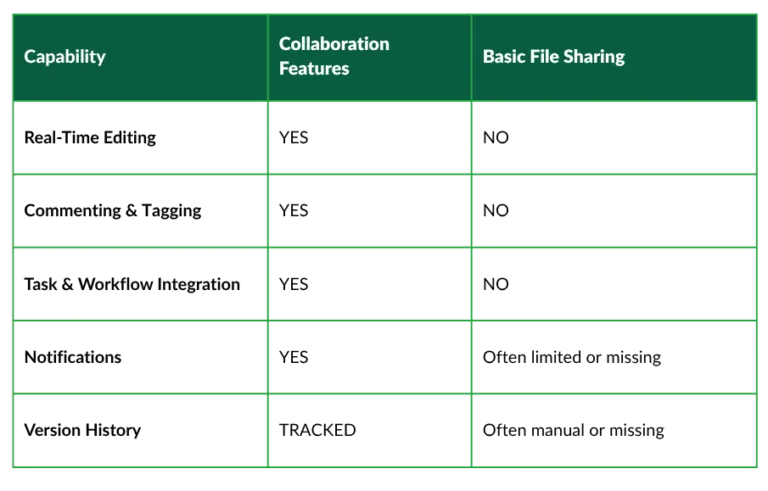
Collaboration Features vs. Basic File Sharing
Real-World Example
Related Terms
- Digital Sales Room
- CPQ Collaboration
- Document Co-Authoring
- Sales Enablement
- Revenue Collaboration
- Approval Workflow
- Internal Alignment
- Sales Ops Automation
- Remote Work Tools
- Digital Deal Desk
Frequently Asked Questions (FAQs)
1. What is the purpose of collaboration features in a sales platform?
To enable internal teams and external stakeholders to work together in real time, reducing delays and improving transparency.
2. Can collaboration features include buyer access?
Yes, many CPQ and CLM systems now include secure buyer-facing deal rooms where prospects can interact, comment, and sign contracts.
3. Do collaboration tools replace email?
They reduce the need for email back-and-forth by keeping conversations and files centralized, searchable, and contextually embedded in the sales workflow.
4. What are must-have collaboration features in CPQ?
Commenting, approval workflows, version control, shared workspaces, and notifications.
5. Are collaboration features secure?
Yes—enterprise-grade tools offer role-based permissions, encrypted access, and audit logs to maintain data integrity.
The Future of Sales is Collaborative
In an increasingly hybrid and fast-paced sales environment, the ability to collaborate instantly and effectively is a competitive advantage. Collaboration features bridge the gaps between people, departments, and even buyers—helping teams close deals faster and more intelligently. At servicePath™, we build intelligent quote-to-cash solutions with robust collaboration capabilities.
Ready to take the Next Step?
📞 Contact us for a demo | 📚 Explore success stories | 🎧 Listen to our CEO’s podcast with Frank Sohn